Cyber readiness for small businesses is no longer just an IT department issue. For many UK SMEs, it is a practical business continuity question: could you still trade, communicate, invoice customers and recover work if email, accounts, devices or data were disrupted?
The latest UK Government Cyber Security Breaches Survey 2025/2026 says 43% of businesses identified a cyber breach or attack in the previous 12 months. The National Cyber Security Centre also warns that small organisations are not too small to be targeted, with 1 in 2 small businesses suffering a cyber incident every year.
That does not mean every business needs to become a cyber expert. It does mean owners, directors, operations managers and office managers should understand the simple controls that make day-to-day disruption less likely and recovery more realistic.
Table of Contents
Why cyber readiness for small businesses matters now
Cyber risk often sounds technical, but the impact is usually operational. A phishing email can lead to a compromised mailbox. A weak password can expose invoices or customer conversations. A lost laptop can create a data problem. A failed backup can turn a small incident into days of lost work.
The Government survey found that phishing remains the most common type of breach or attack experienced by businesses. That matters because phishing does not usually begin with sophisticated hacking. It often starts with a convincing email, a rushed payment request, a fake login page or a member of staff trying to do the right thing quickly.
For SMEs, the practical question is not “are we perfectly secure?” Very few organisations can honestly answer yes. A more useful question is “have we covered the basics well enough to reduce common risks and recover if something goes wrong?”
1. Check whether important accounts use two-factor authentication
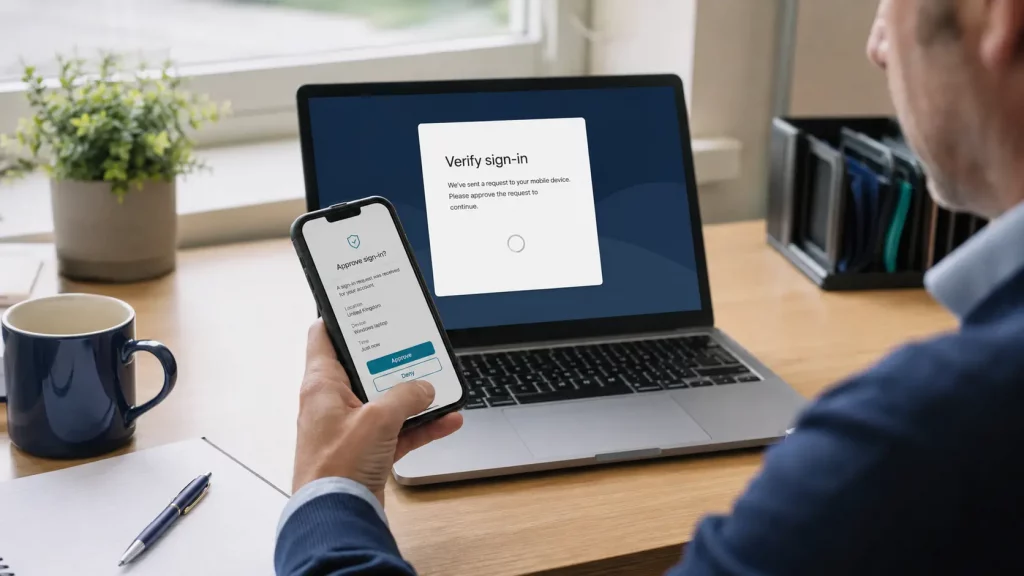
Two-factor authentication, often shortened to 2FA, adds a second step when someone logs in. That might be an app prompt, security key or code. It helps protect accounts even if a password is guessed, stolen or entered into a fake login page.
Start with the accounts that would hurt most if they were compromised. That usually includes email, finance systems, domain and website logins, remote access tools, cloud storage, admin accounts and any system used to speak to customers or suppliers.
If 2FA is available but not switched on, make that an early priority. If staff find it irritating, explain the business reason in plain English: it helps stop a stolen password becoming a full account takeover.
2. Review how your business handles phishing emails
Phishing is still effective because it targets people, pressure and routine. A message might appear to come from a supplier, senior colleague, delivery firm, bank or familiar online service. The aim is usually to make someone click, enter a password, open an attachment or approve a payment.
Small businesses can reduce this risk without turning every email into a technical investigation. Agree simple rules that staff can follow when something feels unusual. For example, payment detail changes should be checked by phone using a trusted number, not by replying to the email thread.
It also helps to give people permission to pause. A culture where staff are criticised for slowing down can make phishing more likely to succeed. A culture where staff can ask “does this look right?” is usually safer.

3. Make sure backups exist and can actually be restored
Backups are only useful if they are current, protected and recoverable. Many businesses believe they have backups because something was set up years ago, but they have not checked whether the latest files are included or whether recovery works in practice.
Ask three simple questions. What data would stop the business operating if it disappeared? Where is that data backed up? When did someone last test a restore?
The NCSC small organisations guide recommends backing up important data and keeping backups separate from the devices or systems they protect. For an SME, this is less about technical perfection and more about confidence. If a laptop fails, a file is deleted or an account is compromised, you need a realistic route back to work.
4. Keep devices, software and access under control
Business devices do not need to be complicated to manage, but they should not be forgotten. Laptops, desktops, phones, routers and shared devices should be kept updated, protected by strong sign-in methods and removed from access when people leave the business.
Admin access deserves particular attention. If too many people have high-level permissions, a single compromised account can cause far more damage. Staff should have the access they need to do their jobs, not broad access to everything by default.
This is also a good time to look at older equipment and unmanaged personal devices. If staff are using a mixture of home laptops, shared passwords and untracked apps, the business may not know where its data is stored or who can access it.
5. Decide who owns cyber risk day to day
In many SMEs, cyber risk falls between roles. The owner assumes the external IT supplier is handling it. The office manager assumes the owner has approved the setup. Staff assume someone else is checking accounts, backups and devices. That gap can become the real risk.
Someone should own the basic checklist. That person does not need to be deeply technical, but they should know who to ask, what systems matter and when reviews happen. They should also have authority to challenge weak practices, such as shared passwords or unverified payment changes.
For directors, this is increasingly part of normal business governance. The UK Government Cyber Governance Code of Practice describes cyber risk as a material risk for almost all organisations. For an SME, that can start with clear ownership, regular review and sensible escalation when something is not understood.
6. Create a simple continuity plan before an incident happens
A continuity plan does not need to be a thick document. It can be a short, practical note that answers the questions staff will ask under pressure.
- Who should be contacted if email, phones or key systems are unavailable?
- How will the business communicate with customers and suppliers?
- Which systems must be restored first?
- Where are supplier, support and account recovery details kept?
- Who is allowed to approve urgent payments or changes during disruption?
- When should the business report an incident or seek specialist help?
The value is not in having a perfect policy. The value is in avoiding confusion when time matters. A small amount of planning can stop a technical incident becoming a wider business problem.

A quick cyber-readiness checklist for UK SMEs
If you only have 30 minutes, start with this list. It gives you a practical view of where the business may be exposed.
- Important accounts use two-factor authentication.
- Staff know how to check unusual payment or login requests.
- Backups cover important files and have been tested recently.
- Devices and software are kept updated.
- Old staff accounts are removed promptly.
- Admin access is limited to people who genuinely need it.
- There is a named person responsible for basic cyber checks.
- The business has a simple continuity plan for email, phones, files and customer communication.
If several of those points are unclear, the next step is not panic. It is review. A calm review can show which risks need urgent attention and which can be improved gradually.
How 1Connect can fit into the conversation
For many SMEs, cyber readiness overlaps with wider business technology. Email, phones, connectivity, devices, support arrangements and continuity planning all affect whether the business can keep operating when something goes wrong.
1Connect works with businesses across connectivity, communications, managed services and support-led technology relationships. If you are not sure who owns your current setup, or whether your arrangements are resilient enough, a conversation with 1Connect managed services can help you review where clearer ownership or stronger planning may be needed.
This should not be treated as a promise that any single provider can remove cyber risk. No one can. The goal is to make the common risks harder to exploit, reduce avoidable disruption and give the business a clearer route to recovery.
Final thought
Cyber security can sound like a specialist topic, but cyber readiness for small businesses starts with practical habits. Protect the accounts that matter. Help staff spot suspicious requests. Keep backups recoverable. Know who owns the checklist. Write down what happens if a key system is unavailable.
Those steps will not make a business immune to cyber incidents, but they can make it better prepared, less exposed and more confident when something unexpected happens.
If you are not sure whether your current setup is resilient enough, speak to 1Connect about reviewing your business connectivity, communications and technology support arrangements. A simple conversation can help identify where clearer ownership, stronger account protection or better continuity planning may be needed.
Sources: UK Government Cyber Security Breaches Survey 2025/2026; NCSC Small Organisations Guide to Cyber Security; UK Government Cyber Governance Code of Practice.